canvas笔记
发表日期:2022-08-22 09:18:53 | 来源: | | 浏览(3213) 分类:页面相关
<!DOCTYPE html>
<html>
<head>
    <meta charset="utf-8">
    <title></title>
    <style>
        #imooc{
            border:1px solid #ccc;
            /*width: 800px;*/
        }
    </style>
</head>
<body>

<canvas id="imooc" width="800" height="800"></canvas>

<script>
    // 根据id属性获取到canvas标签
    const canvas = document.getElementById('imooc');

    // 获取到canvas的 渲染上下文, 渲染上下文的概念后面有讲到
    const ctx = canvas.getContext('2d');


    ctx.fillStyle = 'orange';
    ctx.fillRect(10, 10, 100, 100);
    ctx.stroke();


    // 打线笔移动到起点
    ctx.moveTo(5,5);
    // 开始描线到终点
    ctx.lineTo(80,30);
    // 选择绿色的画笔
    ctx.strokeStyle="red";
    // 开始用画笔描边
    ctx.stroke();

    ctx.beginPath();
    //绘制第一条线段
    ctx.moveTo(10,10);
    ctx.lineTo(100,50);
    ctx.lineTo(200,10);
    ctx.strokeStyle="red";
    ctx.lineWidth=4;       //设置线段宽度为4px
    ctx.stroke();

    ctx.beginPath();
    //绘制第二条线段
    ctx.moveTo(10,30);
    ctx.lineTo(100,70);
    ctx.lineTo(200,30);
    ctx.strokeStyle="green"
    ctx.lineWidth=5;       //设置线段宽度为5px
    ctx.stroke();

    ctx.beginPath();
    //绘制第三条线段
    ctx.moveTo(10,50);
    ctx.lineTo(100,100);
    ctx.lineTo(200,50);
    ctx.strokeStyle="blue"
    ctx.lineWidth=6;       //设置线段宽度为6px
    ctx.stroke();

    ctx.beginPath();
    ctx.moveTo(250,10);
    ctx.lineTo(250,100);
    ctx.lineTo(300,100);
    ctx.lineTo(300,10);
    ctx.lineTo(250,10);
    ctx.closePath();
    ctx.strokeStyle="blue"
    ctx.lineWidth=8
    ctx.stroke();

    ctx.rect(350,10,300,100);
    ctx.strokeStyle = "hlsa(60,50%,50%,0.5)"
    ctx.fillStyle = "hlsa(60,50%,50%,0.5)"
    ctx.fill();
    ctx.stroke();
    ctx.closePath();

    ctx.beginPath();
    ctx.rect(10,200, 100,100)
    let lg = ctx.createLinearGradient(10,100, 110,100) // 1. 创建渐变线
    lg.addColorStop(0, "#ff0000")    // 2. 设定关键点
    lg.addColorStop(0.5, "#fff")  // 2. 设定关键点
    lg.addColorStop(1, "#000")    // 2. 设定关键点
    ctx.fillStyle = lg;           // 3. 填充应用渐变线
    ctx.fill();


    ctx.beginPath();
    ctx.rect(200,200, 100,100)
    let lg1 = ctx.createLinearGradient(200,300, 300,300) // 1. 创建渐变线
    lg1.addColorStop(0, "#ff0000")    // 2. 设定关键点
    lg1.addColorStop(0.5, "#fff")  // 2. 设定关键点
    lg1.addColorStop(1, "#000")    // 2. 设定关键点
    ctx.strokeStyle = lg1;           // 3. 填充线性渐变
    ctx.stroke();


    ctx.beginPath();
    ctx.rect(350,200, 100,100)
    let lg2 = ctx.createRadialGradient(400,250,0,400,250,50) // 1. 创建径向渐变线
    lg2.addColorStop(0, "#ff0000")    // 2. 设定关键点
    lg2.addColorStop(0.5, "#fff")  // 2. 设定关键点
    lg2.addColorStop(1, "rgba(0,0,0,1)")    // 2. 设定关键点
    ctx.fillStyle = lg2;           // 3. 填充应用渐变线
    ctx.fill();

</script>
</body>
</html>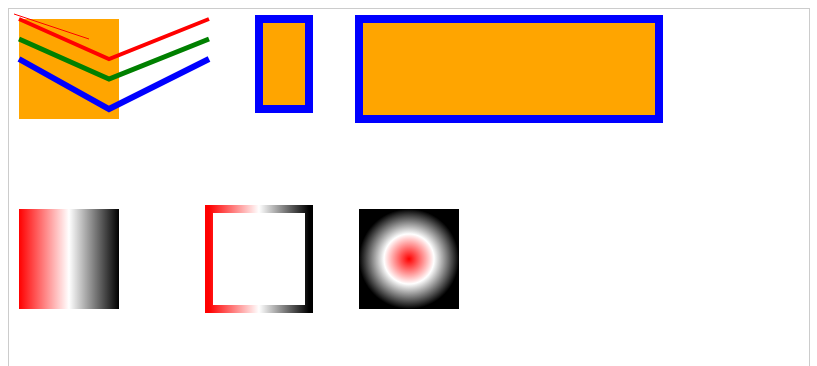
 宁公网安备 64010402001209号